Overview
On Standard Templates, you will see the same updated field labels in the Routing/Reference Information section as you do in free-form payments. These changes apply to all parties where an address may be entered, including Beneficiary, Beneficiary Bank, Intermediary Bank, and By Order Of.
Please note that for free-form payments and file imports, City/Town and Country fields will remain optional until the mandate takes effect. However, templates—whether being created or modified—will require hybrid structure wherever an address is entered. If you edit an existing template and addresses are present, it cannot be submitted again until City/Town and Country are populated. This ensures that no additional templates with incorrect address are created before the mandate.
In templates today, your addresses are captured in an unstructured format.
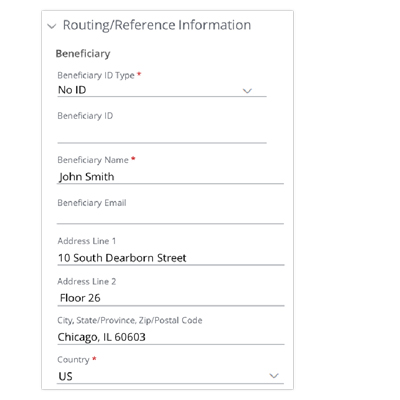
To comply with hybrid address standards, reformat your address details according to the updated labels.
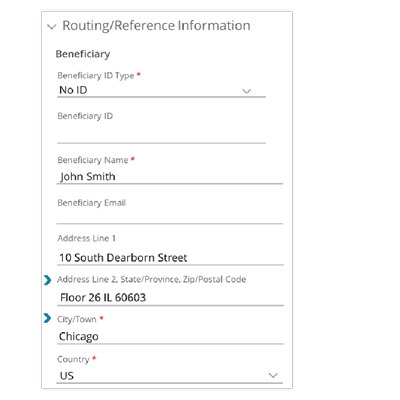
User recommendations
Please note, once the mandate takes effect, any Active template missing required address information will be moved to ‘On Hold’ status. On Hold templates cannot be used for payments until they are updated and reactivated. You have time to make these updates before the requirements go into effect. Updating your templates in advance will help you avoid any interruptions in payment processing.
- Enter the City/Town in its dedicated field.
- Move State/Province and Zip/Postal Code information to the end of Address Line 2, where applicable.
- Address Lines 1 and 2 will allow up to 51 characters each, giving you more space to include all necessary address details. If Address Line 2 exceeds the limit, move the overflow from the beginning of Address Line 2 to the end of Address Line 1 to maintain the correct order.
See instructions on how to bulk update your templates.
- In the upper right of your Templates grid, go to Utilities (three dots menu) and select ‘Export all Active Templates to Access CSV’.
- For any party with an address, ensure the City and Country columns are populated:
- Beneficiary: Columns U (Field 21) and W (Field 23)
- Beneficiary Bank: Columns AE (Field 31) and AF (Field 32)
- Intermediary Bank: Columns AU (Field 47) and AV (Field 48)
- By Order Of: Columns BD (Field 56) and BE (Field 57)
- Make necessary changes in the CSV file, then import the updated template file.
- Note: Update the Template Name in the CSV to avoid duplicate Template errors during import.
- After importing, delete the corresponding existing templates to prevent duplicates.