File Imports
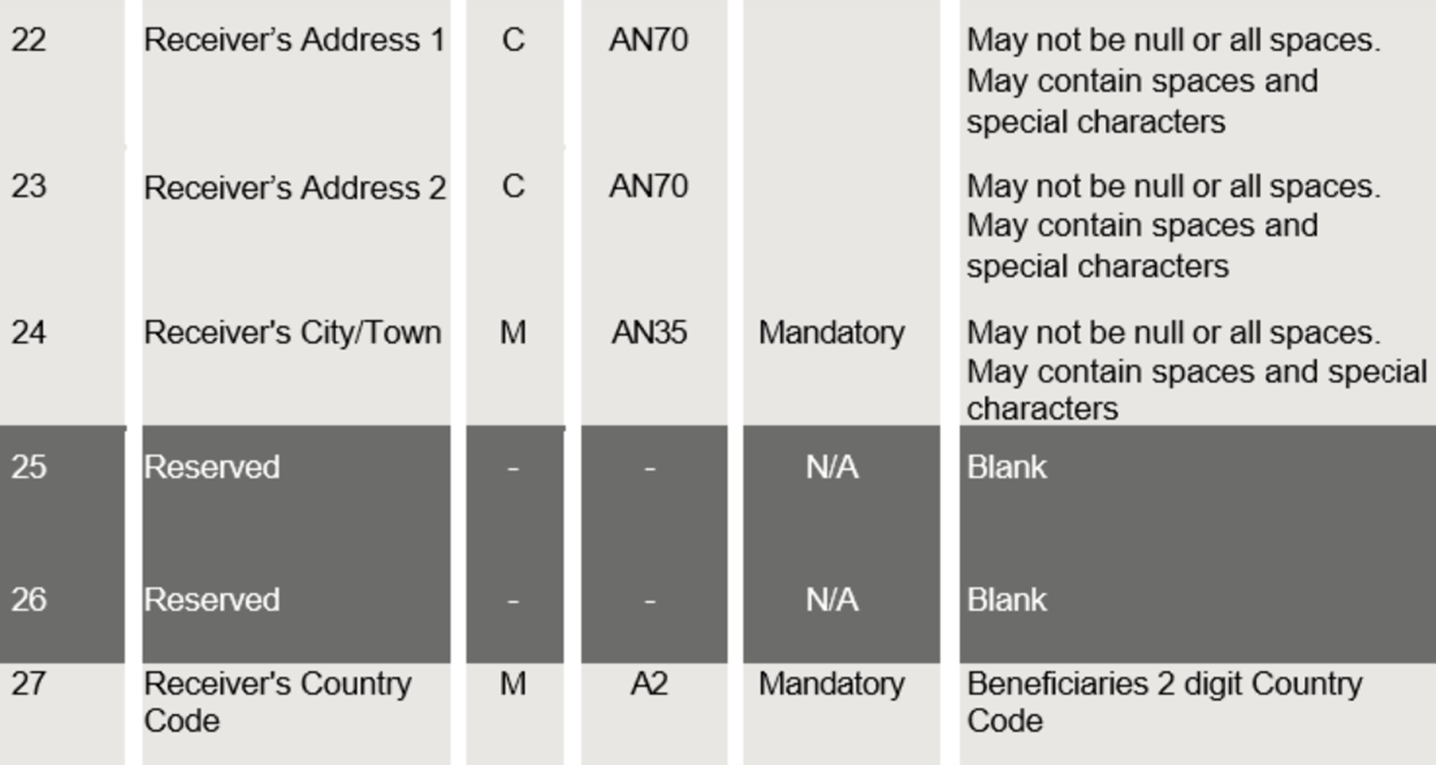
Validate Files for address format
When testing J.P. Morgan Access® CSV or Access (Classic) FTI files, you can select the ‘Validate address format’ checkbox to test for compliance. In addition to standard validation checks, this enhanced test also identifies fields that require updates before the mandate takes effect. A successful test indicates the file meets the hybrid address format standard during file import.
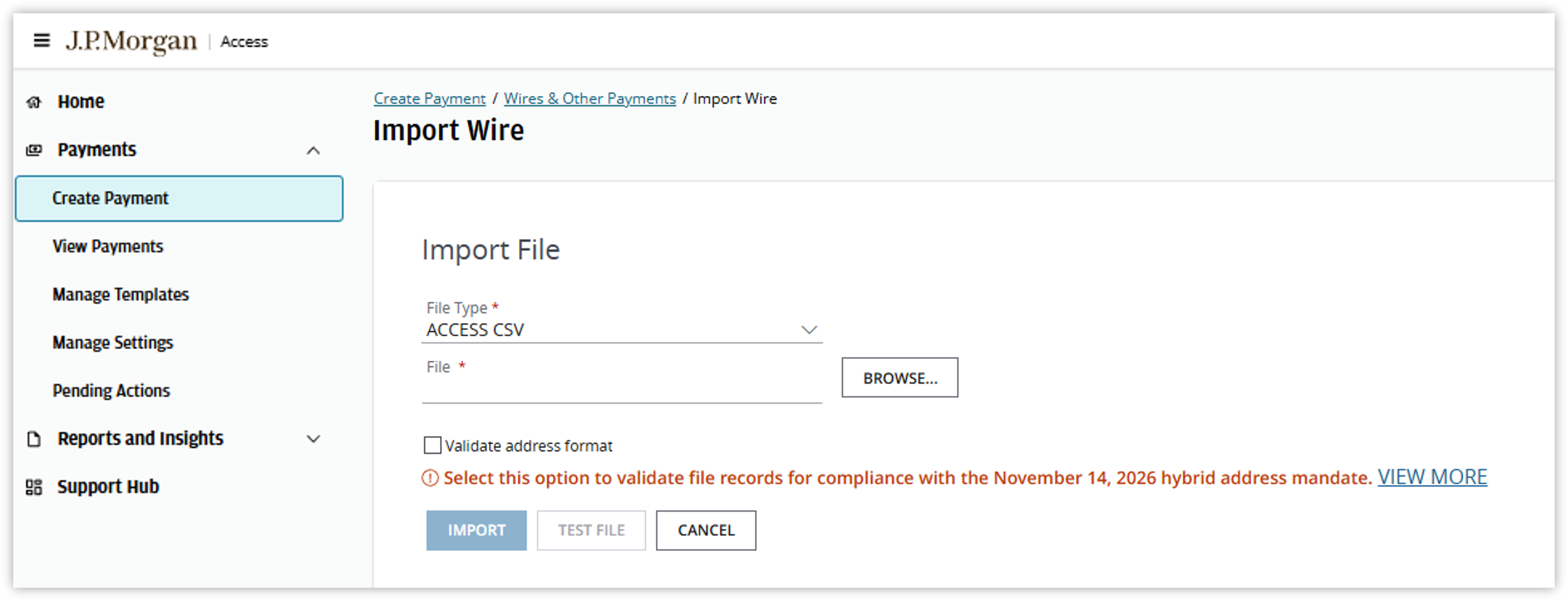
J.P. Morgan Access® CSV File Imports for Payments & Templates
For the J.P. Morgan Access® CSV file format, you will see updated field labels in the Routing/Reference Information section. These changes apply to all parties where address information may be entered, including Beneficiary, Beneficiary Bank, Intermediary Bank, and By Order Of.
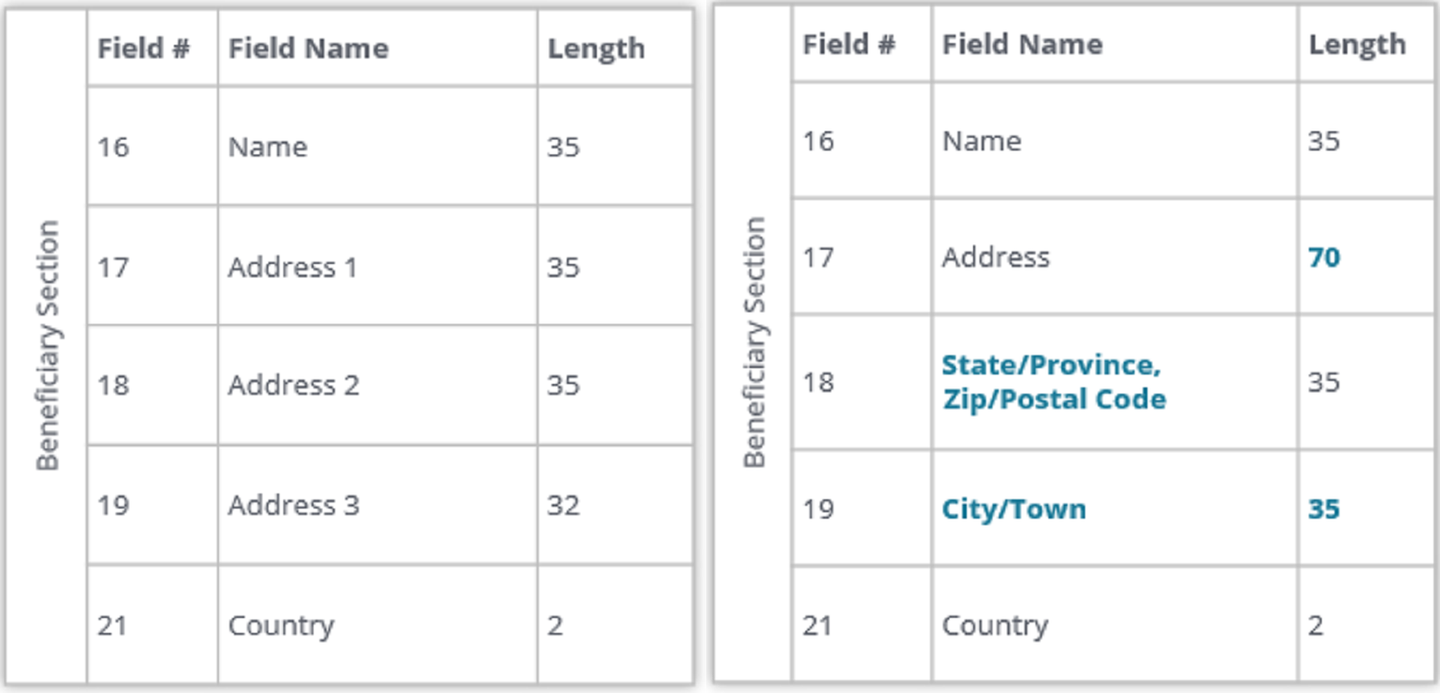
The first image displays the Access CSV file's Beneficiary Section with payment party Field #, Field Name and Length columns. Line 17 has a Field Name of "Address 1" and has a Length of 35. Line 18's Field Name is "Address 2" and line 19 is "Address 3".
The second image displays the Access CSV file's Beneficiary Section with payment party Field #, Field Name and Length columns. Line 17 has been updated to have a Field Name of "Address" and Length of 70. Lines 18's Field name is now "State/Province, Zip/Postal Code and line 19 is "City/Town".
| Currently, your addresses are captured in an unstructured format. | To comply with hybrid address standards, reformat your address details according to the updated labels. |
User recommendations
- If an address is provided, City/Town and Country must be entered in their dedicated fields.
- Enter State/Province, Zip/Postal Code in its dedicated field, where applicable.
- Append any details previously kept in Address 2 to the end of Address, which will allow up to 70 characters.
FTI GMT File Imports for Payments
For those using FTI GMT format to initiate payments from non-U.S. markets, you will also see the label updates across all parties. These changes apply to all parties where address information may be entered, including Beneficiary, Beneficiary Bank, Intermediary Bank, and By Order Of.
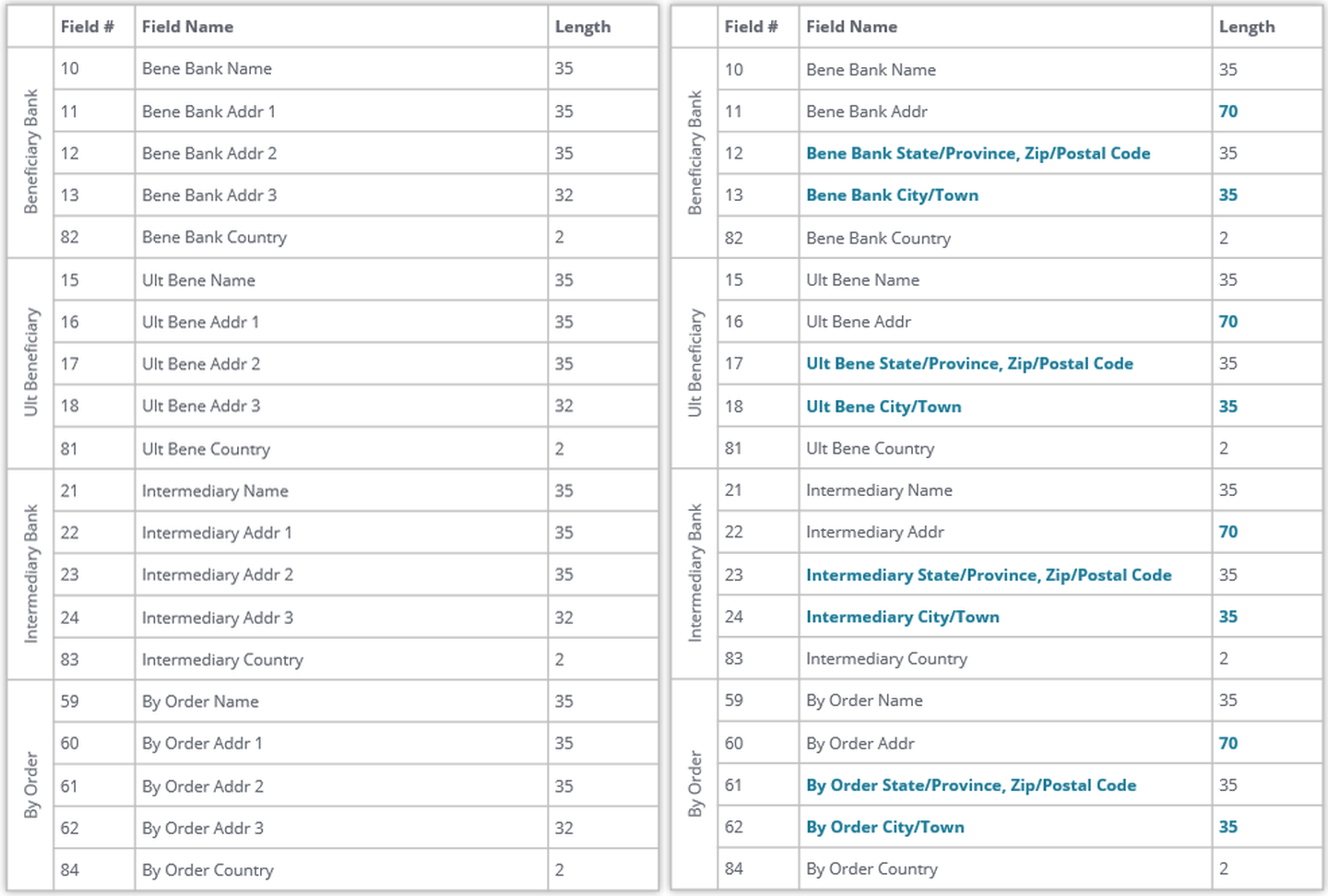
The first image displays the Access FTI GMT file specification with payment party Field #, Field Name and Length columns.
The second image again displays the Access FTI GMT file specification with payment party Field #, Field Name and Length columns.
This image, however, has updated Field # 12 from "Bene Bank Addr 2" to "Beneficiary Bank State/Province, Zip/Postal Code".
Field # 13 is updated from "Bene Bank Addr 3" to "Bene Bank City/Town".
Field # 17 Ult Bene Addr 2" to "Ult Bene State/Province, Zip/Postal Code".
Field #18 updated from Ult Bene Addr 3" to "Ult Bene City/town".
Field # 23 "Intermediary Bene Addr 2" to "Intermediary Bene State/Province, Zip/Postal Code".
Field #24 updated from "Intermediary Bene Addr 3" to "Intermediary Bene City/town".
Field #61 updated from "By Order Addr 2" to "By Order State/Province, Zip/Postal Code"
Field # 62 "By Order Addr 3" to "By Order City/Town".
| Currently, your addresses are captured in an unstructured format. | To comply with hybrid address standards, reformat your address details according to the updated labels. |
User recommendations
- If an address is provided, City/Town and Country must be entered in their dedicated fields.
- Enter State/Province, Zip/Postal Code in its dedicated field, where applicable.
- Append any details previously kept in Address 2 to the end of Address, which will allow up to 70 characters.
FTI DMT File Imports for Payments
For those using FTI DMT format to initiate payments from U.S. markets, you will also see the label updates across all parties.
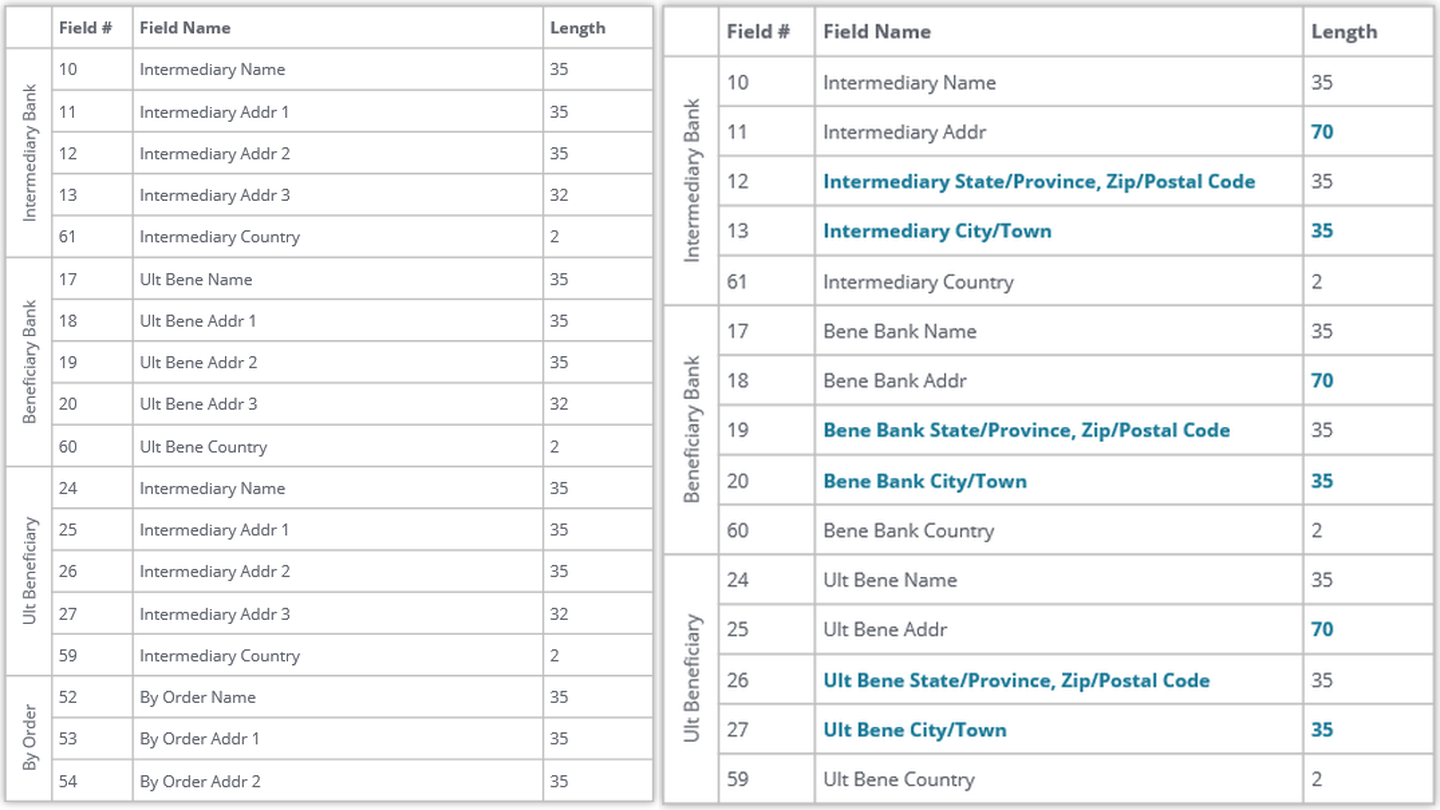
The first image displays the Access FTI DMT file specification with payment party Field #, Field Name and Length columns.
The second image again displays the Access FTI DMT file specification with payment party Field #, Field Name and Length columns.
This image, however, has updated Field # 12 from "Intermediary Addr 2" to "Intermediary State/Province, Zip/Postal Code".
Field # 13 is updated from "Intermediary Addr 3" to "Intermediary City/Town".
Field # 19 Ult Bene Addr 2" to "Bene Bank State/Province, Zip/Postal Code".
Field #20 updated from Ult Bene Addr 3" to "Bene Bank City/town".
Field # 26 "Intermediary Addr 2" to "Ult Bene State/Province, Zip/Postal Code".
Field #27 updated from "Intermediary Addr 3" to "Ult Bene City/town".
| Currently, your addresses are captured in an unstructured format. | To comply with hybrid address standards, reformat your address details according to the updated labels. |
User recommendations
- If an address is provided, City/Town and Country must be entered in their dedicated fields.
- Enter State/Province, Zip/Postal Code in its dedicated field, where applicable.
- Append any details previously kept in Address 2 to the end of Address, which will allow up to 70 characters.
- If an address is entered, both City/Town & Country must also be included. However, the FTI DMT file format does not support By Order ‘Country’ field. To use By Order party, convert to Access CSV format which supports all required fields.
For those using FTI DMT format to initiate Drawdowns:
User recommendations
- If an address is entered, both City/Town & Country must also be included. However, since this file format does not support Debit Account ‘Country’ field or Debit Bank ‘Country’ field, convert to Access CSV format to capture all the required fields.
Global ACH
Validate Files for address format
When testing J.P. Morgan Access® ISO 20022 and/or GDFF files for Switzerland, you can select the ‘Test your file for hybrid address mandate’ option to test address format compliance with ISO 20022 Hybrid Postal Address standards. In addition to standard validation checks, this enhanced test also identifies fields that require updates before the industry mandate takes effect. A successful test indicates the file meets the current hybrid address format specifications during file import. Please note, this confirmation is limited to the files and scenarios tested and does not constitute a guarantee of performance or compliance for future payments.
We encourage you to continue following SWIFT and any applicable market-level guidance to help ensure continued compliance with industry standards and local law requirements so all payments can be processed without issue.
Depending on the Import, the option can look slightly different but perform the same validation.
ISO 20022 (Multi Country)
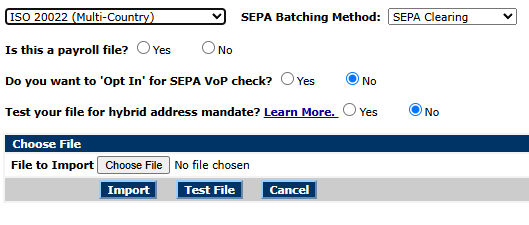
Screenshot of a SEPA file import screen. At the top are dropdowns set to “ISO 20022 (Multi-Country)” and “SEPA Batching Method: SEPA Clearing.” Below are three yes/no radio questions: “Is this a payroll file?” (not selected), “Do you want to ‘Opt In’ for SEPA VoP check?” (No selected), and “Test your file for hybrid address mandate?” with a “Learn More” link (No selected). A “Choose File” section shows “File to Import” with a “Choose File” button and “No file chosen,” and three buttons along the bottom: “Import,” “Test File,” and “Cancel.”
ISO 20022 CHF (Switzerland)
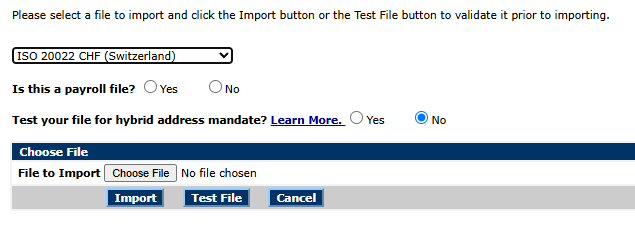
Screenshot of a file import interface. A drop-down menu is set to “ISO 20022 CHF (Switzerland).” Radio button options ask “Is this a payroll file?” with “No” selected, and “Test your file for hybrid address mandate?” with “No” selected. Below are a “Choose File” button, a file selection field showing “No file chosen,” and action buttons labeled “Import,” “Test File,” and “Cancel.” Instructions at the top tell users to select a file, then import it or test it before importing.
GDFF (Multi Country)
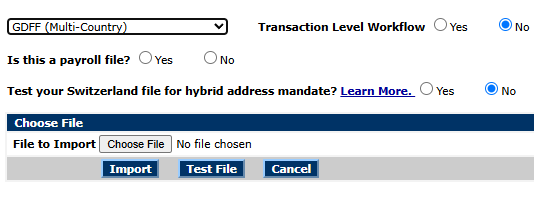
Screenshot of a file import form. The file format drop-down is set to “GDFF (Multi-Country).” A “Transaction Level Workflow” option is displayed with “No” selected. Additional options ask “Is this a payroll file?” and “Test your Switzerland file for hybrid address mandate?” with “No” selected for both. Below are a “Choose File” button, a file upload field showing “No file chosen,” and action buttons labeled “Import,” “Test File,” and “Cancel.”
Files that have the hybrid option selected will see the word “HYBRID” in the file type column.

For SEPA Credit Transfer ISO pain.001 v3/v9 files, any address information provided will require a minimum of town name/city <TwnNm> and country <Ctry> (Table 1).
For Swiss Credit Transfers ISO pain.001 v3/v9 (ch.02/ch.03) file formats, the creditor address information is mandatory and will require a minimum of town name/city and country (Table 1).
Table 1 – SEPA/Swiss Credit Transfers: ISO Element Names for Structured/Hybrid Addresses
| Element description | ISO20022 tag | Occurrences | Data type | Notes |
|---|---|---|---|---|
| Creditor | <Cdtr> | [1..1] | ||
| Name | <Nm> | [1..1] | Text {1,140} | |
| Postal Address | <PsltAdr> | [0..1] | ||
| Department | <Dept> | [0..1] | Text {1,70} | |
| Sub Department | <SubDept> | [0..1] | Text {1,70} | |
| Street Name | <StrtNm> | [0..1] | Text {1,70} | |
| Building Number | <BldgNb> | [0..1] | Text {1,16} | |
| Building Name | <BldgNm> | [0..1] | Text {1,35} | |
| Floor | <Flr> | [0..1] | Text {1,70} | |
| Post Box | <PstBx> | [0..1] | Text {1,16} | |
| Room | <Room> | [0..1] | Text {1,70} | |
| Post Code | <PstCd> | [0..1] | Text {1,16} | |
| Town Name | <TwnNm> | [0..1] | Text {1,35} | Occurrence is [1..1] where postal address is provided |
| Town Location Name | <TwnLctnNm> | [0..1] | Text {1,35} | |
| District Name | <DstrctNm> | [0..1] | Text {1,35} | |
| Country Sub-division | <CtrySubDvsn> | [0..1] | Text {1,35} | |
| Country | <Ctry> | [0..1] | Text [A-Z]{2,2} | Occurrence is [1..1] where postal address is provided |
| Address Line | <AdrLine> | [0..1] | Text {1,70} | |
| Address Line | <AdrLine> | [0..1] | Text {1,70} |
For SEPA Direct Debits ISO pain.008 v2/v8 files, any address information provided will require a minimum of town name/city <TwnNm> and country <Ctry> if the debtor account is in a country outside the EEA. SEPA Direct Debit transactions inside the EEA do not require any address information although we recommend that it is provided (Table 2).
Table 2 – SEPA Direct Debits – ISO Element Names for Structured/Hybrid Addresses
| Element description | ISO20022 tag | Occurrences | Data type | Notes |
|---|---|---|---|---|
| Debtor | <Dbtr> | [1..1] | ||
| Name | <Nm> | [1..1] | Text {1,140} | |
| Postal Address | <PsltAdr> | [0..1] | ||
| Department | <Dept> | [0..1] | Text {1,70} | |
| Sub Department | <SubDept> | [0..1] | Text {1,70} | |
| Street Name | <StrtNm> | [0..1] | Text {1,70} | |
| Building Number | <BldgNb> | [0..1] | Text {1,16} | |
| Building Name | <BldgNm> | [0..1] | Text {1,35} | |
| Floor | <Flr> | [0..1] | Text {1,70} | |
| Post Box | <PstBx> | [0..1] | Text {1,16} | |
| Room | <Room> | [0..1] | Text {1,70} | |
| Post Code | <PstCd> | [0..1] | Text {1,16} | |
| Town Name | <TwnNm> | [0..1] | Text {1,35} | Occurrence is [1..1] where postal address is mandated or provided |
| Town Location Name | <TwnLctnNm> | [0..1] | Text {1,35} | |
| District Name | <DstrctNm> | [0..1] | Text {1,35} | |
| Country Sub-division | <CtrySubDvsn> | [0..1] | Text {1,35} | |
| Country | <Ctry> | [0..1] | Text [A-Z]{2,2} | Occurrence is [1..1] where postal address is mandated or provided |
| Address Line | <AdrLine> | [0..1] | Text {1,70} | |
| Address Line | <AdrLine> | [0..1] | Text {1,70} |
For Swiss Credit Transfers Global Delimited File Format (GDFF), the creditor address will require town name/city and country.